
Find Tailwind classes across your WordPress site automatically.
How It Works
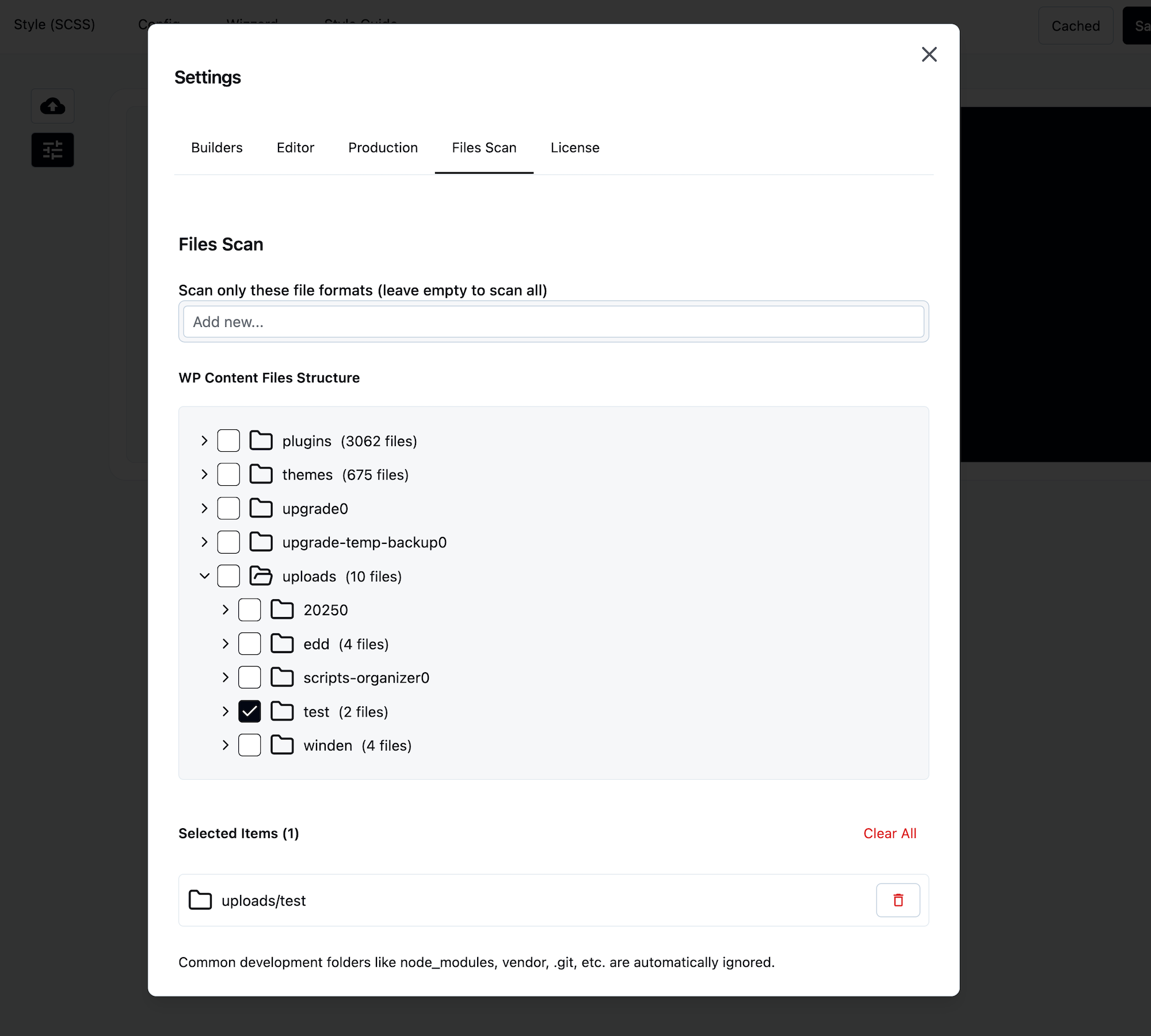
Select folders in the tree view. Everything inside gets scanned for Tailwind classes.
Problem: Tracking classes manually across themes and plugins Solution: Point Winden at your directories and let it find classes automatically
Quick Setup
1. Select Folders
Click folders to select them. Selecting a parent folder scans everything inside.
Smart filtering: Subfolders are automatically removed (no duplicate scanning).
2. Filter File Types
Add extensions to scan only specific formats:
php, html, js, jsx, ts, tsx, twig
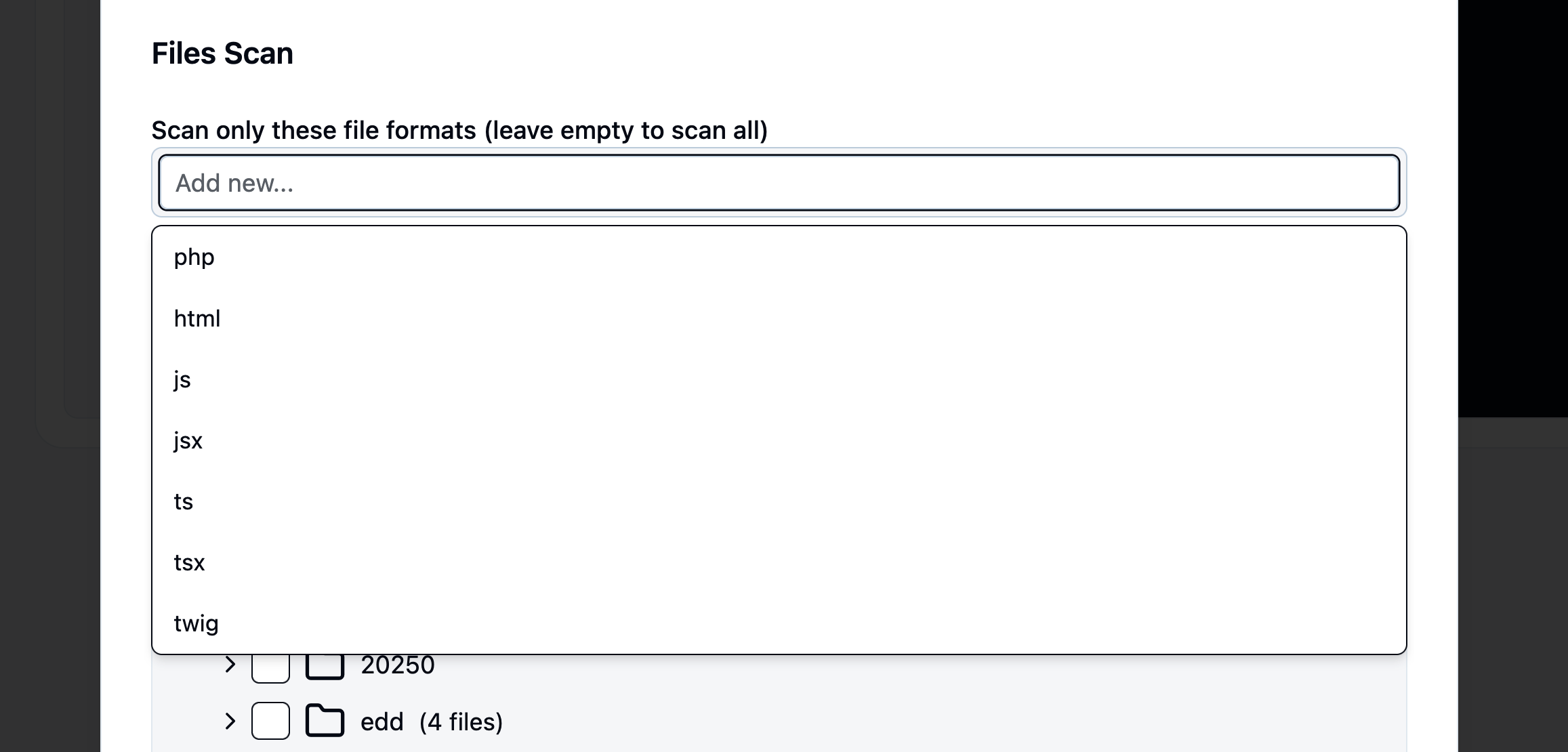

Leave empty to scan all files.
3. Selected Items List
Shows exactly what will be scanned:

Click trash icon to remove. Click Clear All to start over.
What Gets Scanned
Winden looks for these patterns in your files:
HTML/PHP Attributes
class="bg-blue-500 text-white p-4"
React/JSX className
className="flex items-center gap-4"
"className": "container mx-auto"
PHP Arrays
['class' => 'bg-gray-100']
['menu_class' => 'flex space-x-4']
['item_classes' => 'text-lg font-bold']
Pattern: Any PHP array key containing class or classes:
class,classesmenu_class,item_classesclass_name,classes_array
Quoted Strings in Code (Pro)
In PHP, JS, TS, Vue and Twig files, the Pro scanner also reads every quoted string as a possible set of classes, not only class="…" attributes.
This catches classes built from a variable, an array, a sprintf() call, or classList.add().
$cls = 'p-4 flex';
classList.add('bg-blue-500', 'text-white');
Minified files (*.min.*), files over 500 KB, and anything inside node_modules, vendor or .git are skipped, since their strings are not your own classes.
Default Scan Path (Pro)
If you haven't selected any folder, the Pro file scanner scans your active theme automatically, and its parent theme if you use a child theme.
Builder and multipurpose framework themes (Bricks, Hello Elementor, Divi, Extra, Avada, Astra, GeneratePress, Kadence, Blocksy, OceanWP, Neve, and the Oxygen/Breakdance shell themes) are skipped by default, since their files are builder source, not your site's templates.
A child theme built on top of one of these is still scanned.
Use the winden_default_scan_skip_themes filter to change which themes are skipped.
Templates saved as posts by a page builder are always crawled, regardless of this default.
When It Works
✅ Scanning ACTIVE:
- At least one folder selected
- Settings saved
- Selected paths exist on disk
✅ Runs automatically on every Winden compilation
When It Doesn’t Work
❌ Scanning DISABLED:
- No folders selected, and the Pro default theme scan is unavailable (free version)
- Selected paths don’t exist
❌ Classes NOT found:
- Dynamic strings:
class="${prefix}-${color}", or a PHP class built from pieces ('bg-' . $color) - Classes added only by JavaScript at runtime, with nothing in the source files
- Database content (only scans files)
- CSS files (looks for HTML attributes, not CSS)
- Shortcodes inside classic Text widgets
- Arbitrary values in classic menu item classes (WordPress strips the
[and])
Auto-Ignored
These folders are always skipped:
node_modules/, vendor/, .git/, .svn/, dist/, build/
Workflows
Scan Your Theme
- Select
themes/your-theme - Add file types:
php, js - Save
Scan a Plugin
- Select
plugins/your-plugin/templates - Add file types:
php, twig - Save
Developer Hook
Add custom crawlers using the winden_register_crawlers filter to scan classes from any source: database, API, custom formats, etc.
Basic Example
<?php
// File: mu-plugins/my-custom-crawler.php

use Winden\App\Caching\StringParser;

class ACF_Field_Crawler {
    use StringParser;

    public function classes(): array {
        $classes = [];
        $posts = get_posts(['post_type' => 'any', 'posts_per_page' => -1]);

        foreach ($posts as $post) {
            $custom_classes = get_field('custom_classes', $post->ID);
            if ($custom_classes) {
                $parsed = $this->parseString($custom_classes);
                $classes = array_merge($classes, $parsed);
            }
        }

        return array_unique($classes);
    }
}

add_filter('winden_register_crawlers', function($crawlers) {
    $crawlers[] = new ACF_Field_Crawler();
    return $crawlers;
});
Manual Parsing (Without StringParser)
<?php
class Manual_Classes_Crawler {

    public function classes(): array {
        $classes = [];

        // Hardcoded classes
        $classes[] = 'my-custom-class';

        // From API
        $response = wp_remote_get('https://api.example.com/classes');
        if (!is_wp_error($response)) {
            $body = json_decode(wp_remote_retrieve_body($response), true);
            if (isset($body['classes'])) {
                $classes = array_merge($classes, $body['classes']);
            }
        }

        // From database
        global $wpdb;
        $results = $wpdb->get_col("
            SELECT class_name FROM {$wpdb->prefix}my_custom_classes
        ");
        $classes = array_merge($classes, $results);

        // Programmatically generated
        foreach (['red', 'blue', 'green'] as $color) {
            $classes[] = "bg-{$color}-500";
        }

        return array_unique($classes);
    }
}

add_filter('winden_register_crawlers', function($crawlers) {
    $crawlers[] = new Manual_Classes_Crawler();
    return $crawlers;
});
Requirements
- Have a
classes()method that returns an array - Return unique class names as strings
- Register via
winden_register_crawlersfilter
StringParser trait (optional): Use $this->parseString($content) to extract classes with standard Winden patterns.
Select folders to activate scanning. File scanning runs automatically when folders are selected.