
CSS (Sassy CSS) is a CSS preprocessor that extends CSS with powerful features like variables, nesting, mixins, functions, and more. It makes writing and maintaining stylesheets easier and more efficient.
Why SCSS?
- Variables – Define colors, spacing, fonts once and reuse everywhere
- Nesting – Write cleaner, more organized CSS that mirrors your HTML structure
- Mixins – Create reusable style patterns without code duplication
- Functions – Perform calculations and transformations
- Partials – Split CSS into modular, maintainable files
- Operators – Use math operations (+, -, *, /) in your styles
- Imports – Organize styles across multiple files
What are Partials in SCSS?
In traditional SCSS, partials are SCSS files that start with an underscore (\_variables.scss, \_mixins.scss) and are meant to be imported into other SCSS files rather than compiled on their own.
Benefits of traditional SCSS partials:
- Organize styles into logical modules
- Reuse code across multiple files
- Easier maintenance and updates
- Smaller, focused files instead of one giant stylesheet
How to include partials in Blocks?
Global
In the SCSS Partial Settings section:
- Is Global: Toggle ON if this should be included in ALL blocks
- Global Order: Set order (lower numbers = loaded first)
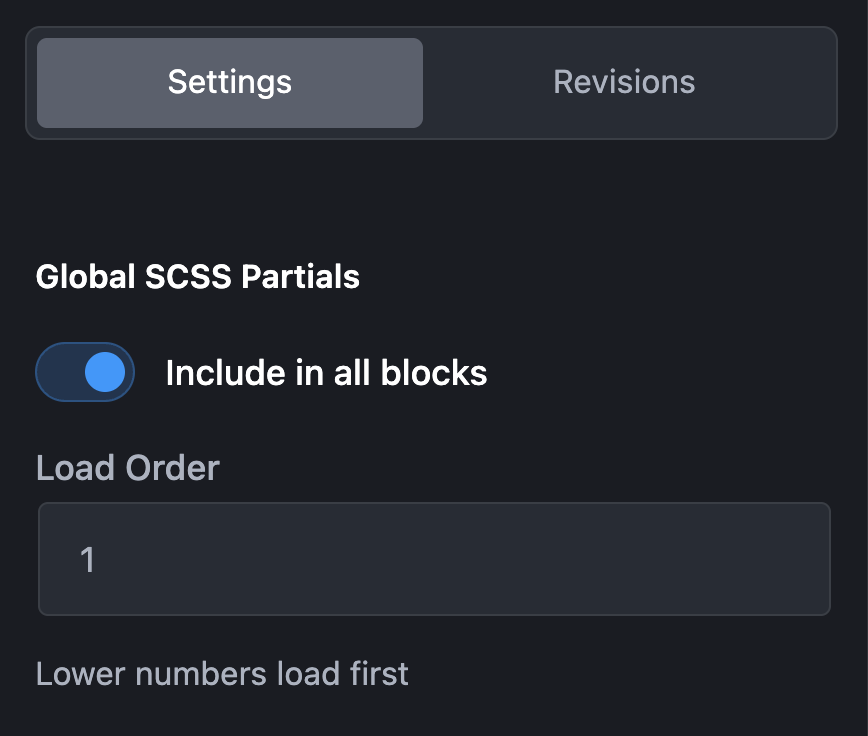
Calling partials from block
If a partial is marked as Global:
- Automatically included in ALL blocks
- No manual import needed
- Loads in order specified by
global\_order
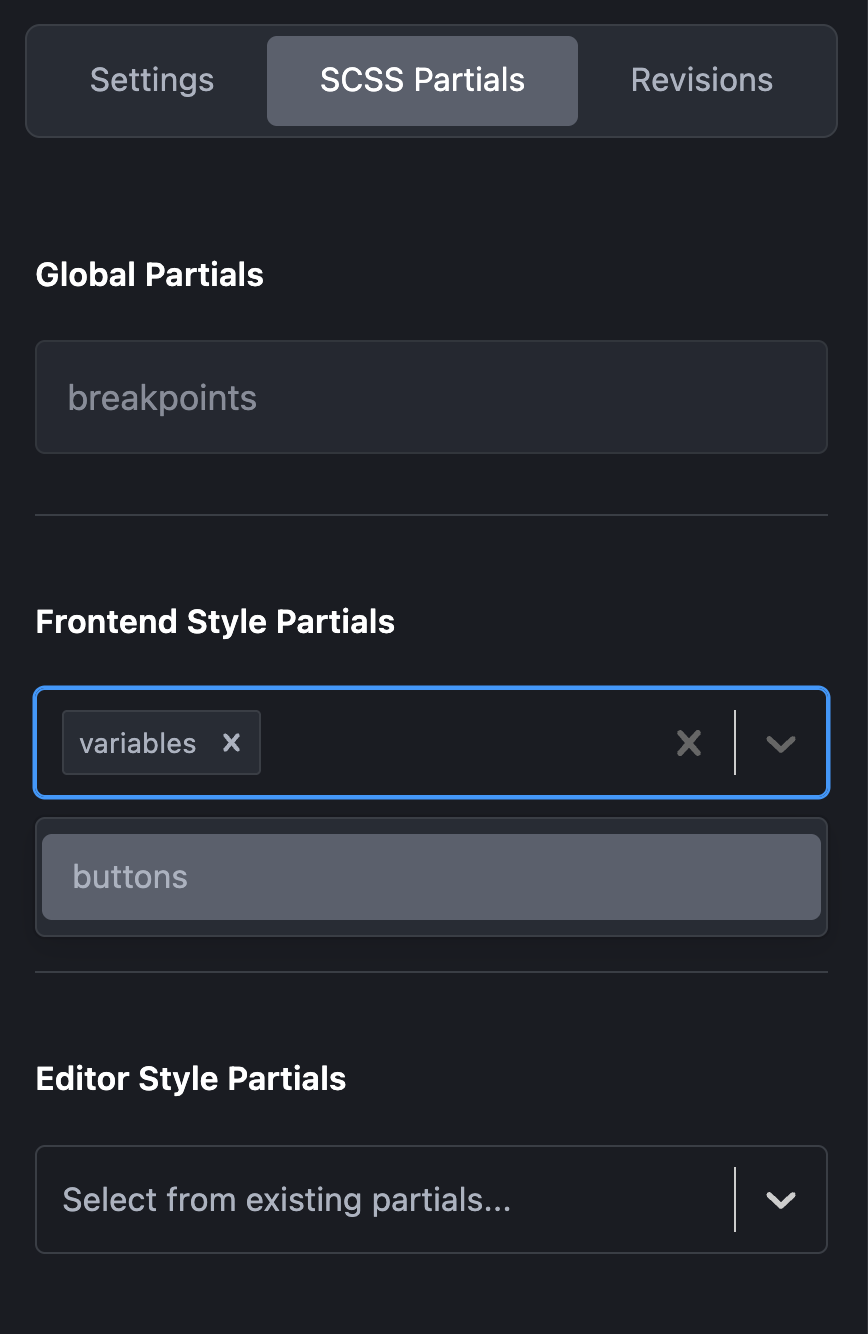
If a partial is NOT global:
- Edit your block
- In Block Settings → SCSS Partials section
- Select partials to include
- Save block
Preview
- Added as global
- Option to add as style.css
- Option to add as editor.css
How SCSS Partials Work
The SCSS Partial Workflow
- Create Partial in WordPress Admin (Funculo Items → Add New → Type: SCSS Partials)
- Write SCSS Code (variables, mixins, utilities, etc.)
- Set Global/Local – Choose if it applies to all blocks or specific ones
- Save & Generate – FanCoolo generates
.scssfile - Use in Blocks – Either automatic (global) or manual (local) inclusion
- Compile – Block SCSS includes the partial and compiles to CSS
File Structure
wp-content/plugins/fancoolo-blocks/
├── my-block/
│   ├── block.json
│   ├── render.php
│   ├── style.scss           # Block's custom SCSS
│   └── style.css            # Compiled (includes global partials + block SCSS)
└── scss-partials/           # Generated partials directory
    ├── variables.scss       # From "Variables" partial post
    ├── mixins.scss          # From "Mixins" partial post
    ├── utilities.scss       # From "Utilities" partial post
    └── buttons.scss         # From "Buttons" partial post
Compilation Order
When a block compiles:
- Global partials (in order:
global_orderfield) - Selected local partials (from block settings)
- Block’s custom SCSS (from Block SCSS metabox)
Bidirectional Compilation
One of FanCoolo’s most powerful features is bidirectional compilation – changes flow in both directions between partials and blocks.
How Bidirectional Compilation Works
┌─────────────────┐         ┌─────────────────┐
│  SCSS Partial   │ ◄─────► │   Block SCSS    │
│   (Variables)   │         │  (Uses vars)    │
└─────────────────┘         └─────────────────┘
        │                           │
        │                           │
        ▼                           ▼
┌─────────────────────────────────────────────┐
│         Automatic Recompilation             │
└─────────────────────────────────────────────┘
Direction 1: Partial → Blocks
When you save a partial, affected blocks automatically recompile
Smart Detection
FanCoolo intelligently determines which blocks to recompile:
Global Partial Changed:
Variables partial saved
    ↓
ALL blocks recompile (because it's global)
    ↓
Every block's style.css updated
Local Partial Changed:
Button Styles partial saved
    ↓
Only blocks that selected this partial recompile
    ↓
3 blocks updated (others unchanged)
Direction 2: Block → Partials Selected
When you select/deselect partials in a block, the block recompiles
Real-Time Updates
Changes propagate instantly in the editor:
Save Partial
    ↓
Backend: Recompile affected blocks (< 1 second)
    ↓
Frontend: Hot reload detects changes
    ↓
Editor: Blocks refresh with new styles
    ↓
You see changes immediately!
Performance Optimization
FanCoolo uses a junction table to track which blocks use which partials:
-- fancoolo_partials_usage table
+---------+-----------+
| post_id | partial_id|
+---------+-----------+
|   42    |    10     |  -- Block 42 uses Partial 10
|   42    |    11     |  -- Block 42 uses Partial 11
|   43    |    10     |  -- Block 43 uses Partial 10
+---------+-----------+
Why this is fast:
❌ Without junction table: Check every block to see if it contains partial reference (slow)
✅ With junction table: Instant SQL query to find affected blocks (fast)