
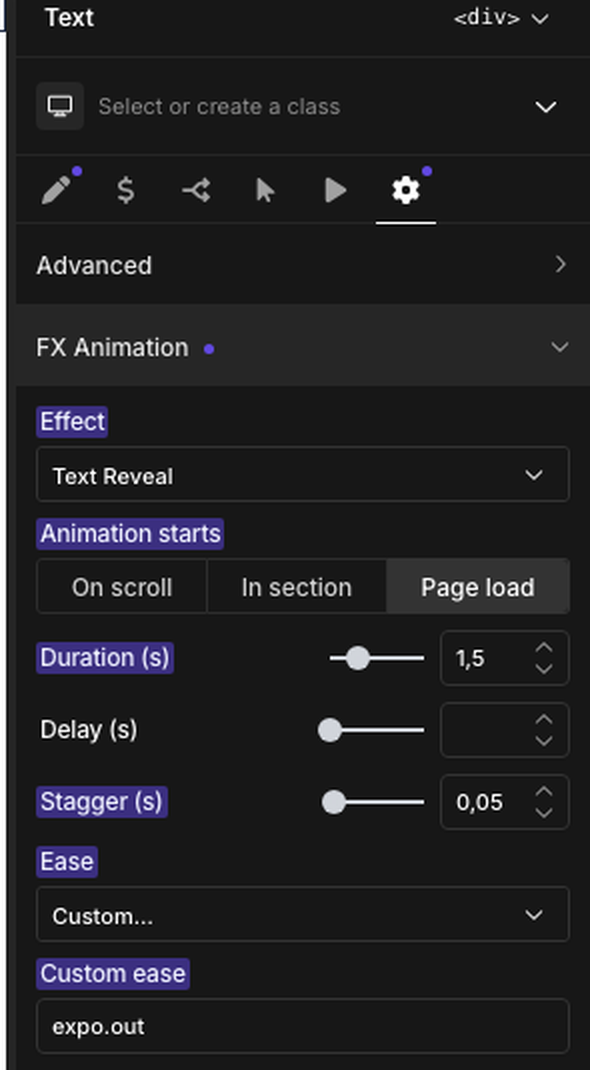
With Oxygen 6 active (Breakdance core running in Oxygen mode), every element gets an FX Animation section in its Settings tab (the gear icon), next to Advanced. It has the same fields as the block editor panel, and Oxygen saves them with the element like any other setting — no separate save step.
Fields
- Effect — pick one of the FX effects. To remove the animation, double-click the Effect label — Oxygen's usual way to reset a setting.
- Animation starts — On scroll (the element reaches the viewport; the default), In section (bare class, scoped by the section selector) or Page load. Scroll-linked effects (Tilt In, Parallax) have no choice here. Draw SVG adds Scrub, which draws the paths as you scroll.
- Duration, Delay — seconds.
- Stagger — seconds between lines, words or letters; text effects only.
- Ease — a preset, or Custom… to type any GSAP ease.
- Start position — a ScrollTrigger start such as
top 70%; shown for scroll-triggered animations. - Y shift — Parallax only.
- Scrub smoothing — Draw SVG with Scrub only.
What it writes to the front end
The section becomes the same fx-* classes the block editor panel writes (for example fx-reveal-st fx-delay-[0.2] fx-start-[top_70%]), added to the element's root tag — see Effects Overview and Modifier Classes for what each class does.
Typing classes into an element's classes field by hand keeps working exactly as before — the FX Animation section and typed classes are two ways of writing the same thing.
Inside the builder
FX stands down inside the Oxygen builder: no animations, no FOUC-hiding CSS and no GSAP/fx.js scripts load in the builder window or its canvas, so elements stay visible and selectable while you work. Use Oxygen's own preview or the live page to see the animation play.
Pages that also use Oxygen's own native animations load Oxygen's copy of GSAP next to FX's — FX keeps using its own copy, so both kinds of animation run side by side without conflicting.
Hiding the panel
Turn off FX panel in Oxygen 6 under Settings → Page builders (shown only when Oxygen 6 is active) to remove the FX Animation section from every element's Settings tab. This only hides the controls — animations already set on elements keep playing on the front end, and their values come back exactly as they were when the panel is turned on again.
Beta note
Oxygen 6 is still in beta. FX detects it through Oxygen's own public helpers; if a future Oxygen release changes or removes the functions FX relies on, the FX Animation section simply stops appearing rather than breaking the builder.