
The Settings tab (Appearance → Fancoolo FX → Settings) controls FX behavior for the whole site — no theme code or PHP required. Changes save via the Save button (or Cmd/Ctrl+S) without reloading the page.
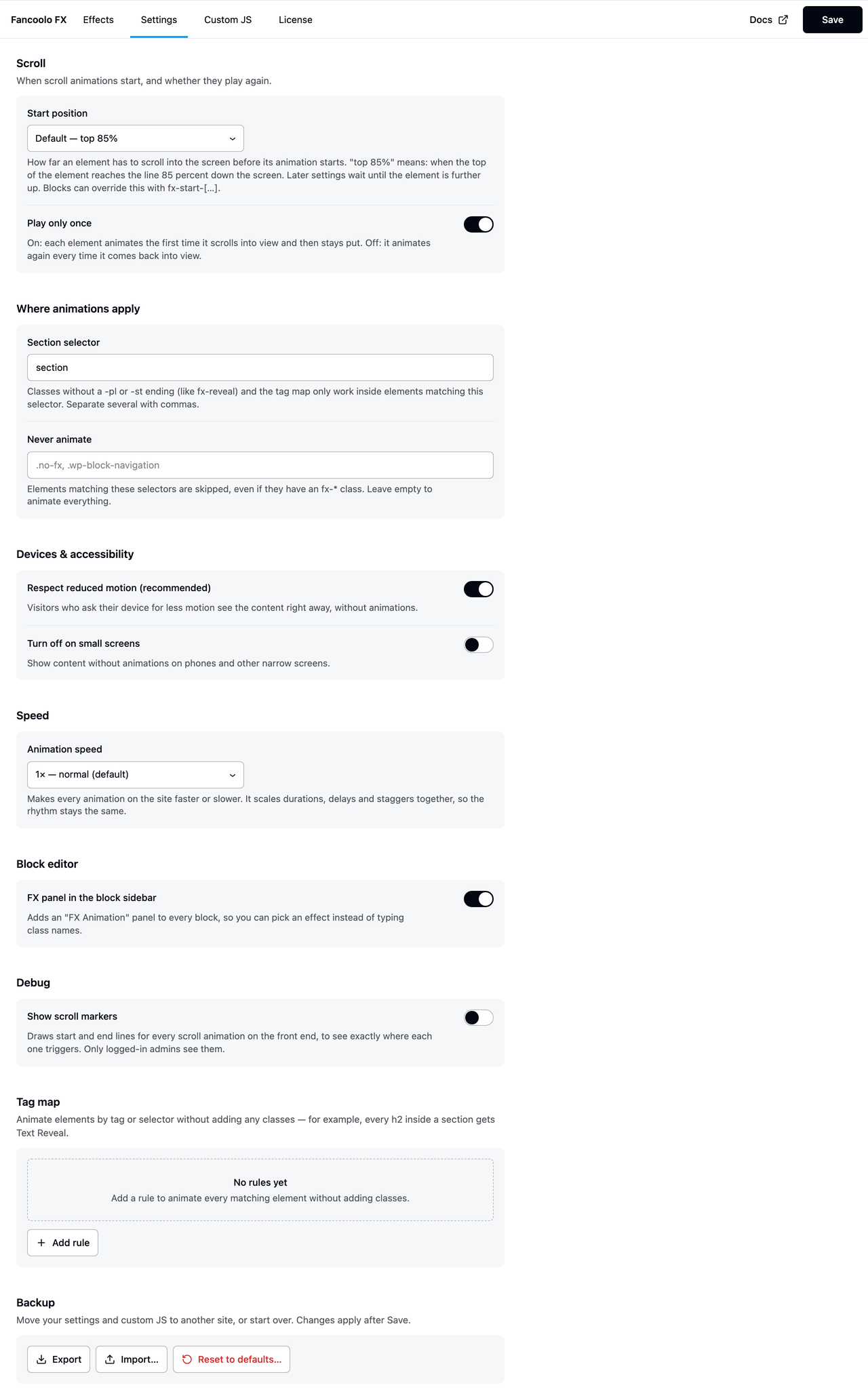
Scroll
- Start position. Default
top 85%. When a scroll animation fires: the first keyword is the element's edge, the second is where on the viewport it has to cross.top 85%means "start when the element's top reaches 85% down the screen". Individual blocks can override this withfx-start-[…]— see Modifier Classes. - Play only once. Default on. On: each element animates the first time it scrolls into view and stays. Off: it replays every time it scrolls back into view.
Where animations apply
- Section selector. Default
section. Classes without a-pl/-stsuffix (bare classes) and the tag map only work inside elements matching this selector. Separate multiple selectors with commas, e.g.section, .wp-block-group. - Never animate. Default empty. A CSS selector list for elements to always skip, even if they carry an
fx-*class.
Devices & accessibility
- Respect reduced motion (recommended). Default on. Visitors whose OS asks for less motion see content immediately, with no animation.
- Turn off on small screens. Default off. When on, a screen-width field appears (default 768px) below which animations are skipped entirely.
Speed
- Animation speed. A dropdown from 0.5× (twice as fast) to 2× (twice as slow), default 1×. Scales every animation's duration, delay and stagger together, so the relative rhythm stays the same. Individual blocks can still override duration with
fx-duration-[…].
Block editor
- FX panel in the block sidebar. Default on. Adds an "FX Animation" panel to every block's settings sidebar, so effects can be picked from dropdowns instead of typed as classes — see Block Editor Panel.
Page builders
Shown only when the matching builder is active on the site — each is on by default.
- FX panel in Bricks. Adds an "FX Animation" group to every element's Style tab when Bricks is the active theme — see Bricks.
- FX panel in Oxygen 6. Adds an "FX Animation" section to every element's Settings tab when Oxygen 6 is active — see Oxygen 6.
Turning either off only hides that builder's panel — animations already set on elements keep playing on the front end, and come back exactly as they were when the panel is turned back on.
Debug
- Show scroll markers. Default off. Draws GSAP's start/end marker lines on the front end for every scroll animation, visible only to logged-in administrators — handy for tuning the start position.
Tag map
A repeater for animating elements by selector without adding classes — see Tag Map for the full explanation. Each row has a CSS selector, an effect dropdown, and a remove button.
Backup
At the bottom of the tab:
- Export downloads every setting on this tab, the tag map, and the Custom JS code as a single JSON file.
- Import uploads a previously exported file and applies it.
- Reset to defaults restores every setting and clears the custom JS editor.
Use export/import to copy your FX configuration between sites.