
The Style Tab is your code editor for custom CSS and Tailwind configuration. Write CSS or SCSS, and Winden compiles it instantly in your browser.
Two Ways to Customize Tailwind
- Wizard Tab – Visual, no-code builder for colors, spacing, fonts, and breakpoints
- Style Tab – Write code for advanced customization and complete control
Both work together! The Wizard generates design tokens that combine with your Style Tab code.
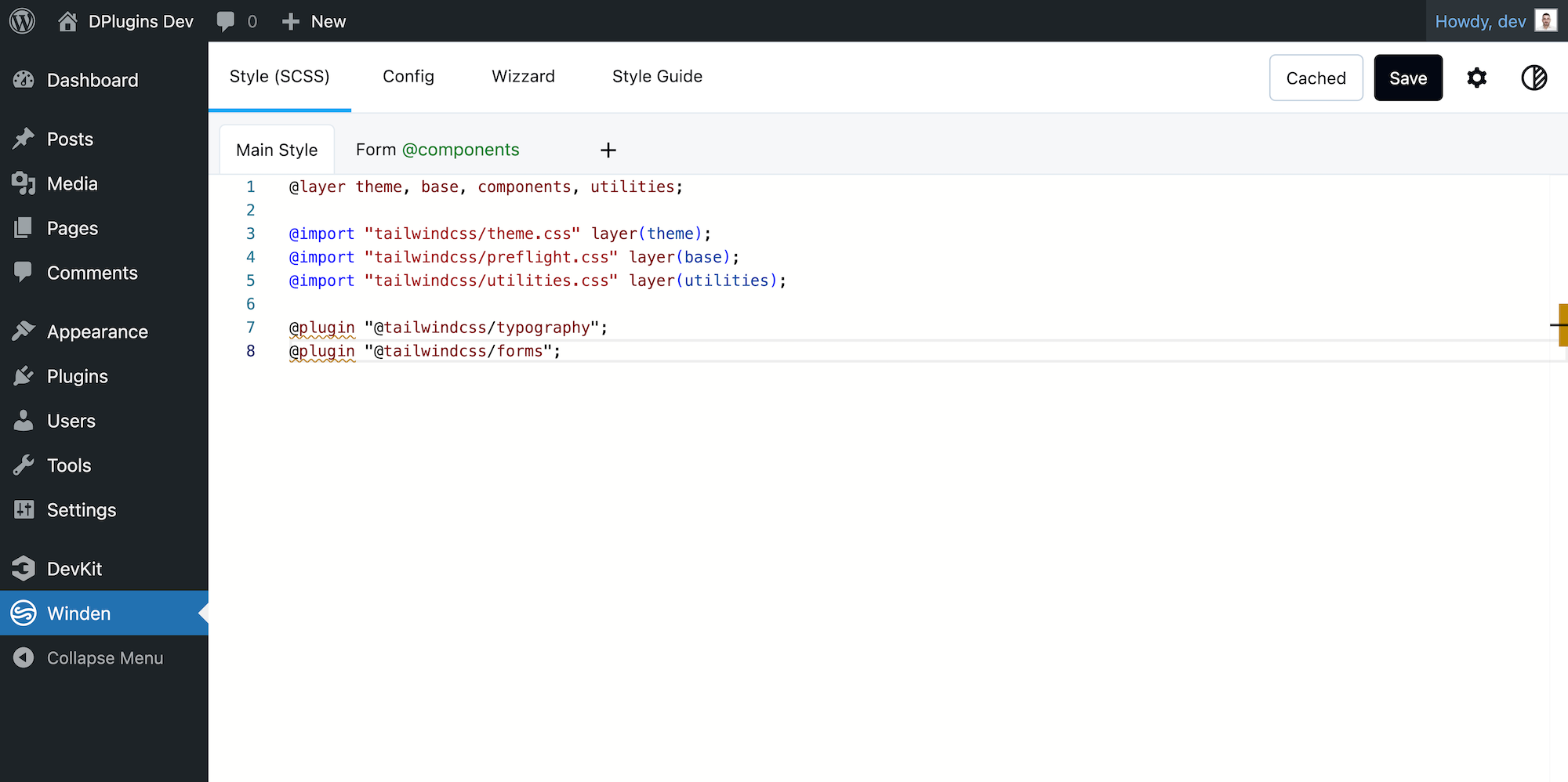
What Makes Winden’s Style Tab Special?
1. Write CSS or SCSS – Your Choice
No need to install build tools or configure anything. Winden automatically detects and compiles SCSS:
Plain CSS:
@theme {
  --color-brand: #6366f1;
}

.btn-primary {
  @apply bg-brand text-white px-4 py-2 rounded-lg;
}
SCSS (with nesting, variables, mixins):
$brand: #6366f1;

.btn {
  @apply px-4 py-2 rounded-lg;

  &-primary {
    background: $brand;
    @apply text-white;
  }

  &:hover {
    @apply scale-105 transition-transform;
  }
}
Just write it – Winden handles the compilation.
2. Smart Autocomplete Built-In
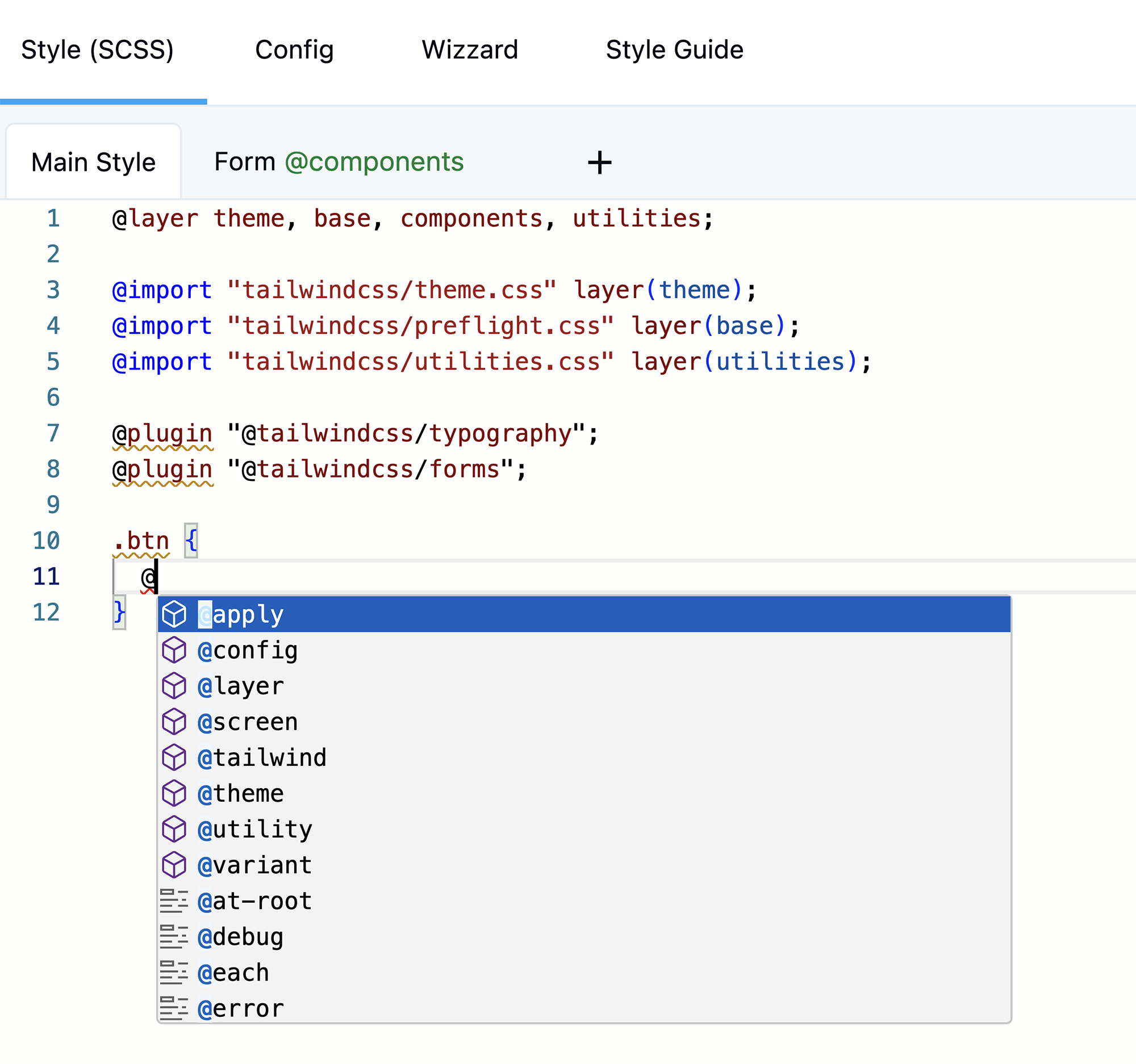
Type @ and see all available Tailwind directives:
@theme– Design tokens (colors, spacing, fonts)@layer– Organize CSS (base, components, utilities)@apply– Use Tailwind classes in your CSS@plugin– Load plugins (3 built-in + unlimited from CDN)@import– Import stylesheets or Tailwind features@variant– Custom variants and media queries
When you use @apply, autocomplete shows:
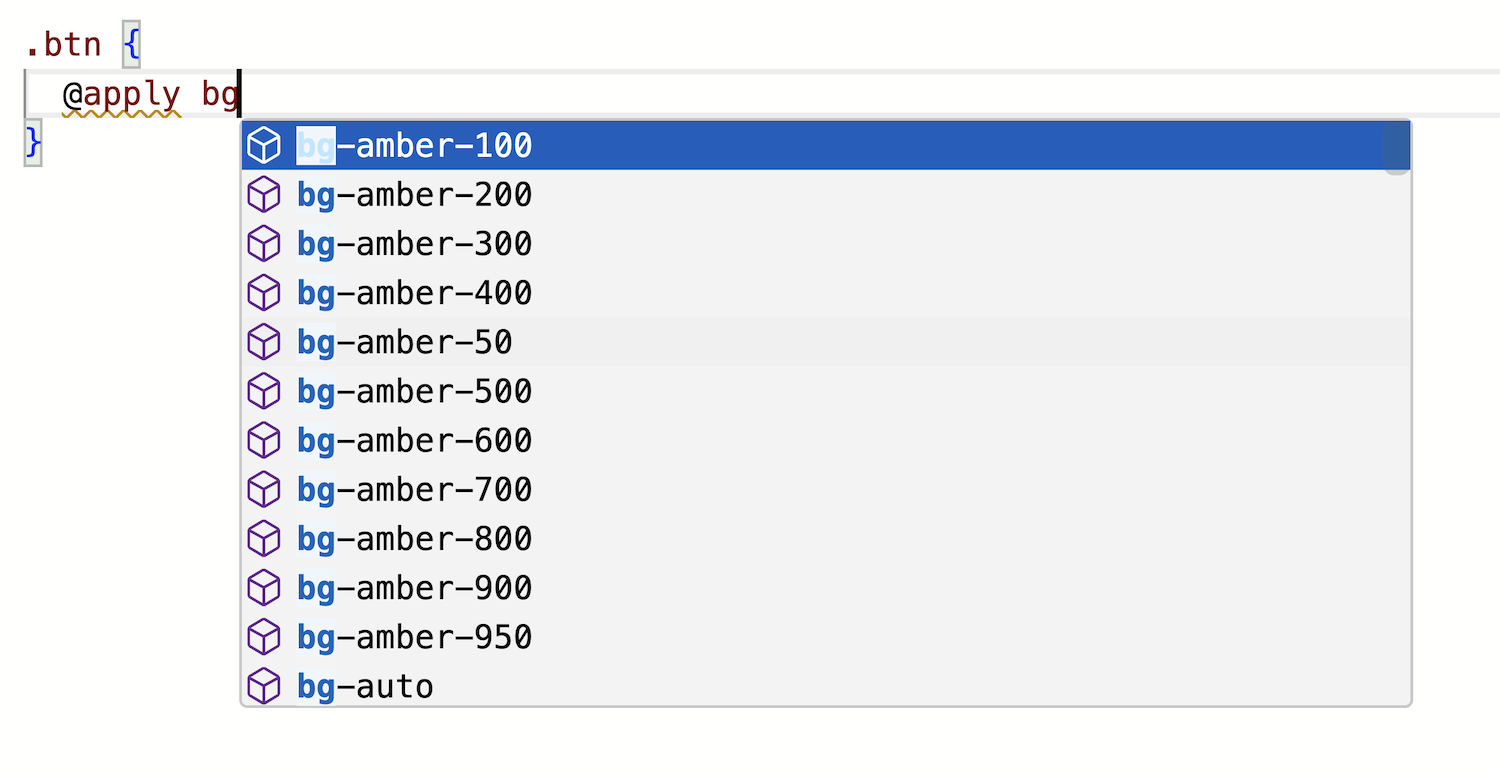
- ✅ All Tailwind classes
- ✅ Your custom Wizard colors
- ✅ Your custom spacing scales
- ✅ Classes from your scanned files
- ✅ Responsive prefixes (sm:, md:, lg:)
- ✅ Hover/focus states (hover:, focus:)
No guessing, no docs lookup – just type and select.
3. Organize with Multiple Tabs
Split your styles into multiple tabs for better organization:

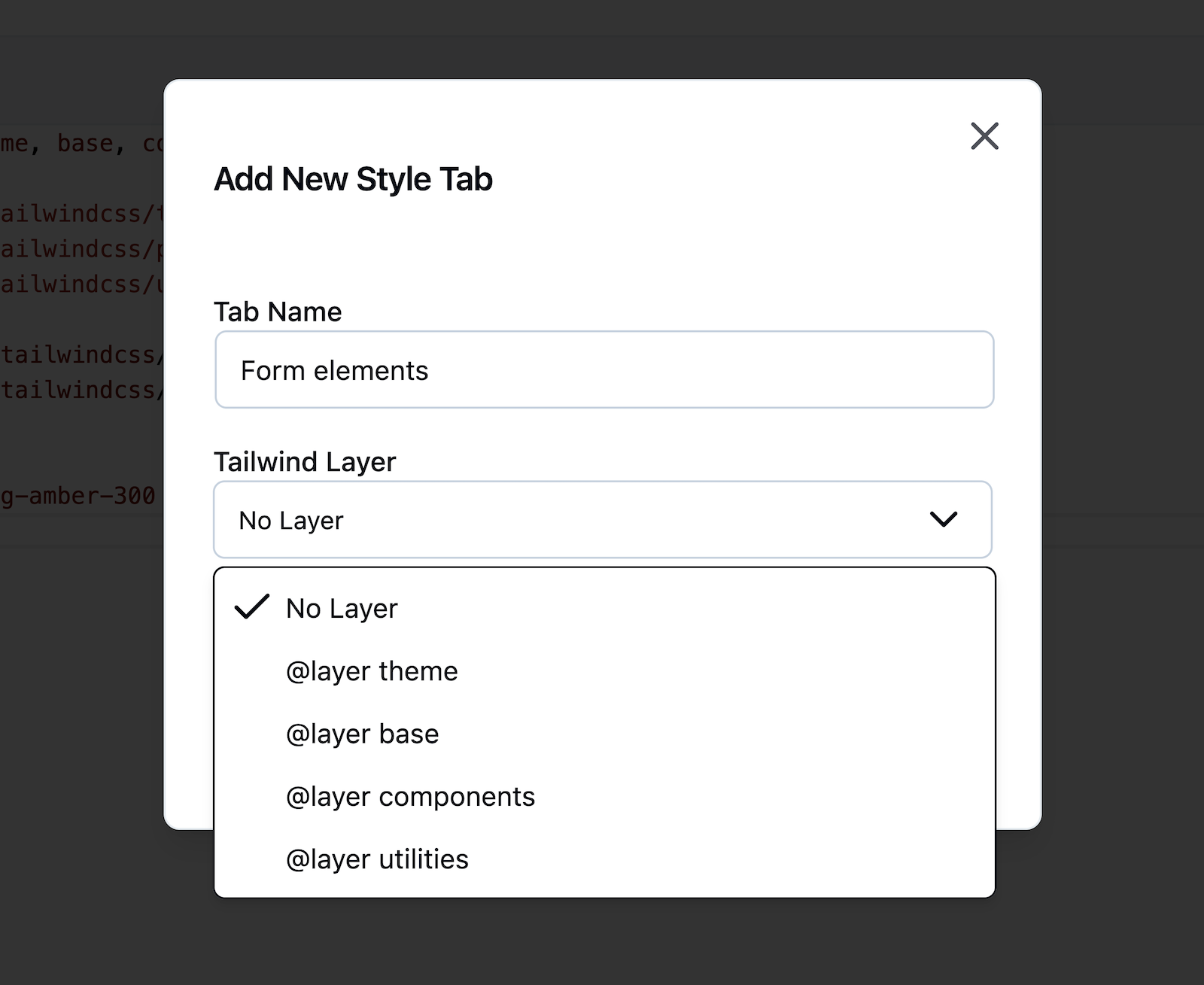

Create tabs by purpose:
- “Base Styles” – Typography, resets
- “Components” – Buttons, cards, forms
- “Shop” – Product cards, checkout
- “Blog” – Post layouts, comments
Each tab can have its own @layer:
- @layer base – HTML element defaults
- @layer components – Reusable components
- @layer utilities – Custom utility classes
- none – Plain CSS or @theme config
Winden automatically combines all tabs in the right order when compiling.
Rename the tab
Double click on the tab name and you will get modal again to edit name and layer
4. Built-in Tailwind Plugins
Winden includes 3 popular plugins ready to use:
@plugin "@tailwindcss/typography";
@plugin "@tailwindcss/forms";
@plugin "@tailwindcss/container-queries";
No installation needed – just reference them and they work.
Want more? Load any plugin from CDN:
@plugin "https://esm.run/daisyui@5";
5. Real-Time Compilation with Smart Error Detection


Changes appear instantly:
- Write your CSS
- Click Save
- See it on your site immediately
No build process, no waiting. All compilation happens in your browser using Tailwind v4’s Lightning CSS engine.
Smart Error Notifications: If something goes wrong, Winden shows clear error messages telling you exactly what happened:
- SCSS errors – Shows the line and column where the syntax error is
- Plugin errors – Tells you which CDN plugin failed to load with suggestions
- Tailwind errors – Points to the specific class or directive causing issues
- Config errors – Shows what’s wrong with your configuration
No confusing technical jargon – just helpful messages that help you fix issues quickly.
6. Works with All Page Builders
Your Style Tab classes are available everywhere:
- ✅ Gutenberg/FSE
- ✅ Bricks Builder
- ✅ Oxygen Builder
- ✅ Elementor
- ✅ Any theme or plugin
Type your custom class names and they appear in autocomplete across all builders.
Quick Examples
Custom Design Tokens
@theme {
  --color-brand: #6366f1;
  --color-accent: #f59e0b;
  --spacing-section: 5rem;
  --radius-card: 1rem;
}
Use them: bg-brand, text-accent, p-section, rounded-card
Reusable Components
@layer components {
  .btn-primary {
    @apply bg-brand text-white px-6 py-3 rounded-lg;
    @apply hover:bg-blue-600 transition-colors;
  }

  .card {
    @apply bg-white rounded-card shadow-lg p-6;
  }
}
Custom Typography
@layer base {
  h1 {
    @apply text-5xl font-bold mb-4;
  }

  p {
    @apply text-base leading-relaxed mb-4;
  }
}
Custom Breakpoints
Option 1: Use Wizard (recommended) Go to Wizard → Breakpoints tab and create them visually.
Option 2: Write code
@theme {
  --breakpoint-tablet: 768px;
  --breakpoint-desktop: 1024px;
}
Now use: tablet:flex, desktop:grid
Custom Variants
@variant hocus (&:hover, &:focus);
@variant max-md (@media (max-width: 768px));
Use them: hocus:bg-blue-500, max-md:hidden
Pro Tips
1. Let Wizard Handle the Basics
Use the Wizard for colors, spacing, and fonts. It’s faster and generates clean, maintainable code automatically.
2. Style Tab is for Advanced Stuff
Use the Style Tab when you need:
- Custom component classes
- Complex selectors
- SCSS features (nesting, variables)
- Third-party plugins
3. Organize with Tabs
Don’t put everything in one tab. Create separate tabs for different sections – it’s easier to maintain.
4. Use @layer Properly
- @layer base – Element defaults (h1, p, a)
- @layer components – Reusable classes (.btn, .card)
- @layer utilities – Single-purpose utilities (.text-balance)
5. Leverage Autocomplete
Type @ to see directives. Start typing class names to see suggestions. This speeds up your workflow significantly.
6. Test in Your Builder
After saving, open your page builder and test the classes. They appear in autocomplete immediately.
Common Questions
Q: Do I need to use the Style Tab? No! If the Wizard covers your needs (colors, spacing, fonts), you’re all set. The Style Tab is for advanced customization.
Q: Can I mix Wizard and Style Tab? Yes! The Wizard generates @theme config that works perfectly with your Style Tab code.
Q: Will my SCSS work? Yes! Winden automatically detects SCSS features (variables, nesting, mixins) and compiles them.
Q: Can I import Google Fonts? Yes! Use @import url('...') in the Style Tab.
Q: Do I need Node.js or build tools? No! Everything compiles in your browser. No terminal, no npm, no build process.
Q: Where can I learn more about Tailwind directives? Check the official Tailwind CSS documentation for complete details on @theme, @layer, @apply, and more.